
LinkedIn Video Downloader -
Save LinkedIn Videos Free
Download videos from public LinkedIn posts instantly. No login required, completely free.
Example: https://www.linkedin.com/posts/username_text-ugcPost-1234567890
Download LinkedIn Videos Even Faster
With the ContentIn Chrome Extension, a download button appears directly on LinkedIn videos — no need to copy URLs. One click and the video is yours.
Install Chrome Extension — It's Free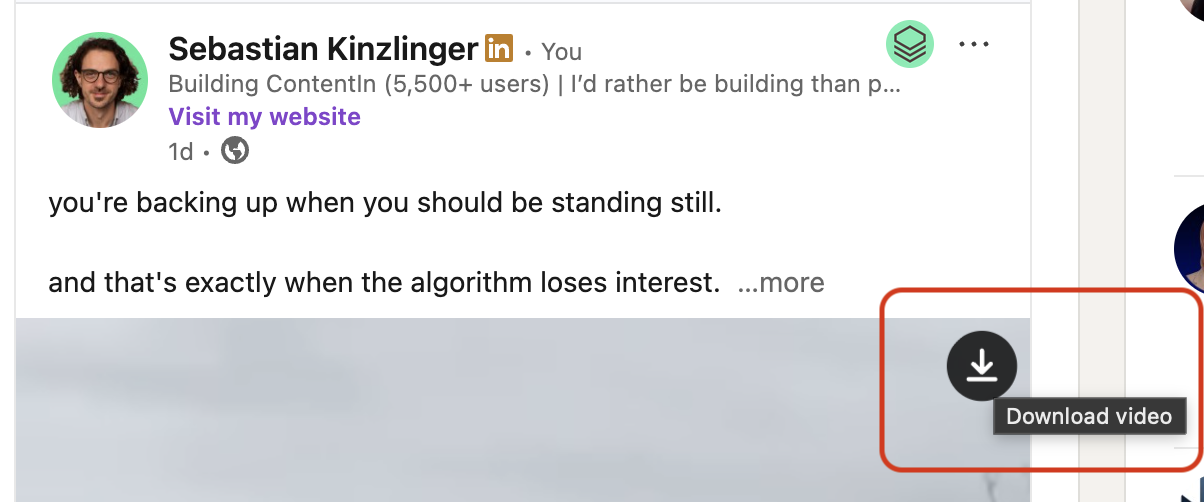
Want to create viral LinkedIn posts?
Try ContentInHow to Download LinkedIn Videos: A Complete Guide
LinkedIn has become a powerful platform for video content, with professionals sharing insights, tutorials, and thought leadership through engaging videos. Whether you want to save a video for offline viewing, archive important content, or analyze successful video strategies, our LinkedIn Video Downloader makes it simple and free.
This tool allows you to download videos from any public LinkedIn post in seconds, without requiring a login or installation. Simply paste the LinkedIn post URL, and we'll extract the video for you to download or preview directly in your browser.
How to Download a LinkedIn Video in 3 Simple Steps
Copy the LinkedIn Post URL
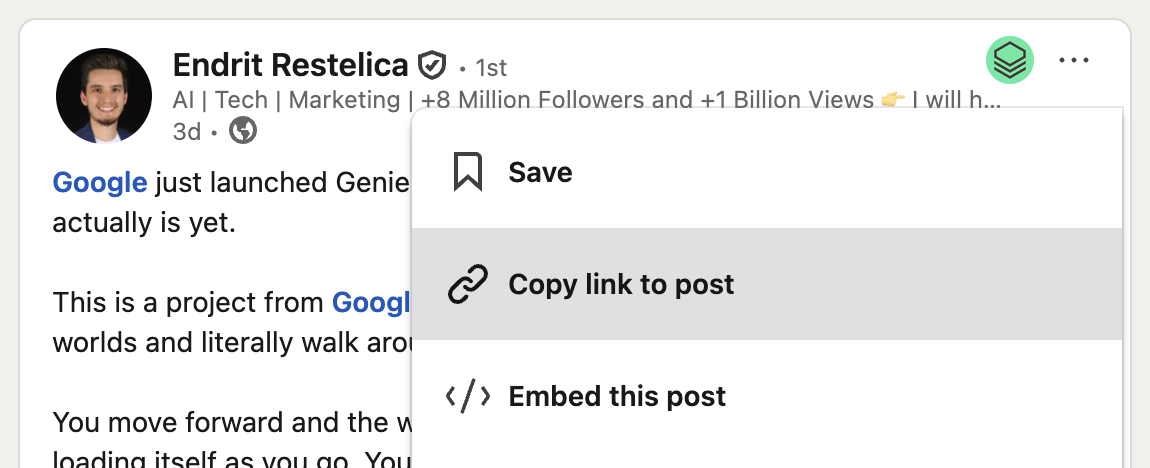
Navigate to the LinkedIn post containing the video you want to download. Click on the three dots menu (•••) in the top right corner of the post and select "Copy link to post" to get the full URL.
Paste URL and Extract Video
Paste the LinkedIn post URL into the input field above and click "Extract Video". Our tool will analyze the post and retrieve the video file within seconds.
Preview or Download
Watch the video directly in your browser or click the "Download Video" button to save it to your device. You can also copy the direct video URL to use elsewhere.
Why Use Our LinkedIn Video Downloader?
Completely Free
No subscriptions, no hidden fees, no credit card required. Download as many LinkedIn videos as you need, completely free forever.
No Login Required
Unlike other tools, we don't require you to sign up or log in with your LinkedIn account. Just paste the URL and download.
Fast & Reliable
Our advanced extraction technology retrieves videos in seconds, ensuring you get the highest quality available from LinkedIn's servers.
Browser-Based
No software installation needed. Works directly in your browser on any device - desktop, mobile, or tablet.
Popular Use Cases for Downloading LinkedIn Videos
Content Research & Analysis
Download successful LinkedIn videos from industry leaders to study their content strategy, presentation style, and engagement tactics. Perfect for marketers and content creators looking to improve their own video content.
Offline Viewing
Save educational videos, webinars, or important announcements for offline viewing during commutes, flights, or when you don't have reliable internet access.
Portfolio & Archive
Creators can download their own LinkedIn videos to build a portfolio, create backups, or repurpose content across other platforms while maintaining full quality.
Training & Education
Companies can save training videos, product demos, or educational content shared by thought leaders for internal training programs or knowledge bases.
Frequently Asked Questions
Is it legal to download LinkedIn videos?
You can download videos for personal use, research, or archival purposes. However, you must respect copyright laws and LinkedIn's Terms of Service. Always credit the original creator and do not redistribute or use videos commercially without permission.
Can I download private LinkedIn videos?
No, our tool only works with public LinkedIn posts. Videos from private posts, restricted accounts, or LinkedIn's premium content cannot be downloaded through this tool.
What video quality can I download?
Our tool extracts the highest quality version available from LinkedIn's servers. The quality depends on what the original uploader provided and LinkedIn's processing.
Do you store the videos I download?
No, we do not store any videos. Our tool simply extracts the direct video URL from LinkedIn and provides it to you. The download happens directly from LinkedIn's servers to your device.
Why isn't my video downloading?
Make sure you're using the full LinkedIn post URL (not a shortened link), the post is public, and it actually contains a video. Some LinkedIn posts embed videos from other platforms (YouTube, Vimeo) which cannot be downloaded through this tool.
Does this work on mobile devices?
Yes! Our LinkedIn video downloader works on all devices including smartphones and tablets. Simply open this page in your mobile browser and follow the same steps.
Important Legal Notice
This tool is provided for personal, educational, and research purposes only. When downloading LinkedIn videos, you must:
- Respect copyright laws and intellectual property rights
- Credit the original content creator when sharing or referencing
- Not use downloaded videos for commercial purposes without permission
- Comply with LinkedIn's Terms of Service and Community Guidelines
- Not redistribute or claim ownership of others' content
We are not affiliated with LinkedIn Corporation and do not endorse copyright infringement. Users are solely responsible for how they use downloaded content.
Level Up Your LinkedIn Game
Download videos for research, then create your own viral LinkedIn posts with ContentIn.
Start Creating Amazing Content