The 12 Best LinkedIn Scheduling Tools in 2026 (Tested and Ranked)

I spent a month testing 12 LinkedIn schedulers. Signed up for trials, paid for subscriptions, scheduled 300+ posts, and broke a few things along the way. Here's what's actually worth your money — and what's free but somehow better than the paid options.

Best LinkedIn Scheduling Tools

I spent a month testing 12 LinkedIn schedulers. Signed up for trials, paid for subscriptions, scheduled 300+ posts, and broke a few things along the way.

Here's what's actually worth your money, and what's free but somehow better than the paid options.


Quick Comparison: All 12 Tools at a Glance

Tool Best For Starting Price Free Plan LinkedIn-Specific AI Features Multi-Platform
ContentIn Solo creators & coaches $0 (Free) ✅ Unlimited scheduling ✅ Yes ✅ AI Ghostwriter ❌ No
Supergrow Agencies & ghostwriters $19/month ❌ 7-day trial ✅ Yes ✅ AI post generator ❌ No
Buffer Multi-platform management $6/channel ❌ 14-day trial ⚠️ Basic ⚠️ AI captions ✅ Yes
Taplio Viral content inspiration $39/month ❌ No ✅ Yes ✅ AI generation ⚠️ X only
AuthoredUp Formatting perfectionists $19.95/month ❌ No ✅ Yes ❌ No ❌ No
Hootsuite Enterprise teams $99/month ❌ Trial only ⚠️ Basic ⚠️ AI recommendations ✅ Yes
MagicPost Post inspiration database $19/month ❌ No ✅ Yes ✅ AI-powered ❌ No
Sendible PDF carousel support $29/month ❌ 14-day trial ✅ Yes ❌ No ✅ Yes
Later Visual planners $25/month ✅ Limited ⚠️ Basic ⚠️ AI captions ✅ Yes
Sprout Social Enterprise CRM integration $199/seat ❌ No ⚠️ Basic ⚠️ AI recommendations ✅ Yes
CoSchedule Marketing calendar hub $19/user ✅ Free calendar ⚠️ Basic ⚠️ Templates ✅ Yes
Scheduled Notion users EUR 9/month ✅ Yes ✅ Yes ❌ No ❌ No

What Makes a LinkedIn Scheduling Tool Worth Your Money

LinkedIn-Specific vs. Multi-Platform: Choose Your Lane

Decide upfront: LinkedIn-only or multi-platform?

LinkedIn-specific tools (ContentIn, Supergrow, Taplio) offer features multi-platform schedulers can't match — first-comment scheduling, carousel builders, post previews showing exact LinkedIn formatting, and algorithm optimization. These tools understand LinkedIn's quirks: character limits, truncation points, formatting behavior.

Multi-platform tools (Buffer, Hootsuite, Sprout Social) spread your content across LinkedIn, Twitter, Instagram, and Facebook from one dashboard. Convenient, but you sacrifice LinkedIn-specific depth. Most can't schedule polls, struggle with advanced tagging, and lack the formatting precision that prevents line break disasters.

If LinkedIn drives your business, go specialized. Managing brand presence across multiple networks? Multi-platform makes sense.

Content Creation: Beyond Just Scheduling

The best tools help you create content, not just queue it. That means AI writing assistance trained on LinkedIn's style, template libraries with proven post structures, and the ability to repurpose existing content into fresh posts. Schedulers without creation features leave you doing the hard work manually, then paying just to click "publish later."

Scheduling Flexibility

Different workflows need different approaches. Queue systems auto-distribute posts at optimal times. Calendar and Kanban views give visual control over your pipeline. Bulk scheduling handles batch-created content. The tool should adapt to your workflow, not force you into theirs.

Analytics That Inform Decisions

Essential metrics: engagement rates, impressions, reach, follower growth, and post performance comparisons. Best-time-to-post recommendations based on your actual audience behavior — not generic advice — are what separate useful analytics from decoration.

Pricing: What You're Really Paying For

Calculate total cost based on your actual needs. Per-channel pricing multiplies with each platform. Per-user pricing affects team scalability. Annual billing typically offers 15–20% discounts but locks you in. The cheapest starting price is rarely what you end up paying.

Team Collaboration

Multi-user access, role-based permissions, and approval workflows prevent costly mistakes. Without these, you're emailing drafts back and forth — which doesn't scale.

The 12 Best LinkedIn Scheduling Tools 

Each tool was evaluated across eight criteria: LinkedIn-specific features, content creation, scheduling flexibility, analytics depth, interface design, pricing, team collaboration, and integrations.

1. ContentIn — Best Overall Value

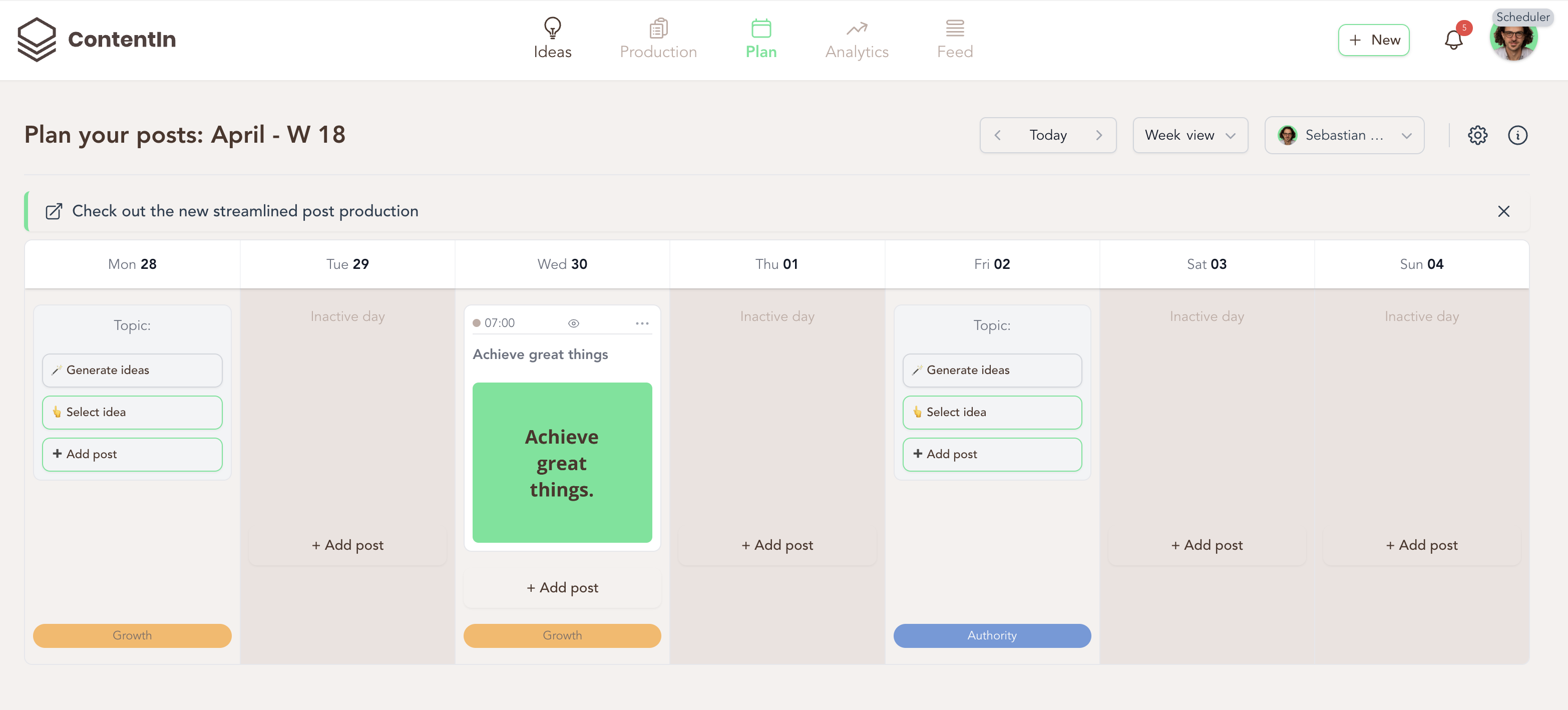
Contentin AI

Best for: Solo creators, coaches, and anyone who wants a complete LinkedIn workflow without paying for five separate tools

ContentIn's free LinkedIn scheduler offers unlimited scheduling for one LinkedIn profile. No credit card. No trial period. No post limit.

The paid version ($29–$59/month) adds an AI ghostwriter that trains on your existing posts and generates drafts that reflect your voice rather than generic output. Feed it 10–15 of your best posts and it learns your style. It's not perfect — expect to edit — but it's a strong starting point.

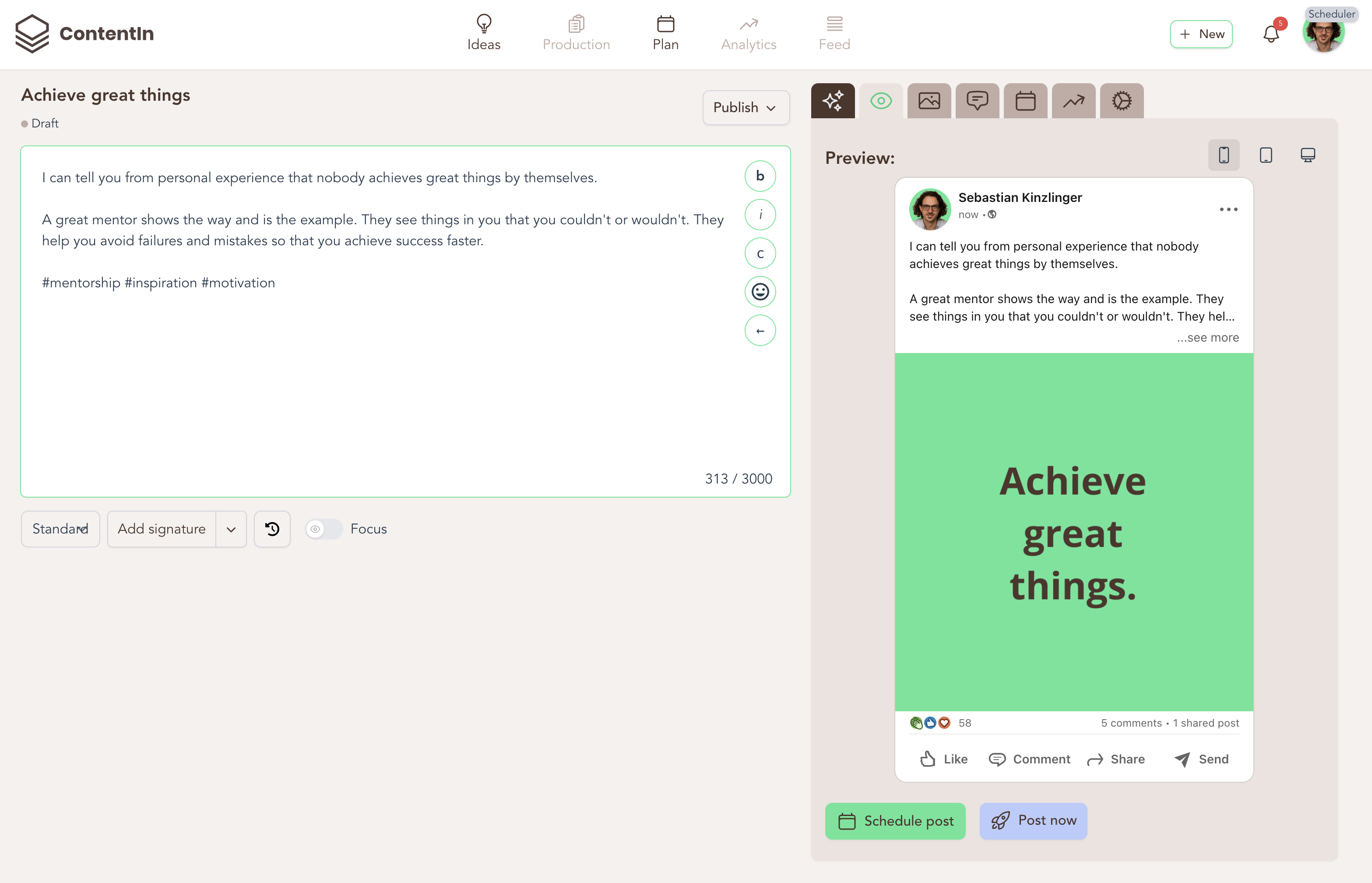
Beyond scheduling, it handles the full LinkedIn content workflow: paste any URL and get post ideas for repurposing, preview exactly how posts will format before publishing, research hashtags, build carousels, and track performance — all in one place. You can see all scheduling features in detail on the LinkedIn post scheduler feature page.

Key Features

  • AI Ghostwriter trained on your writing style (12 to unlimited drafts/month depending on plan)
  • 35+ LinkedIn post templates with proven engagement structures
  • Generate post ideas from any URL (blogs, articles, websites)
  • Post preview showing exact LinkedIn formatting before publishing
  • Unlimited post scheduling on all plans including free
  • FeedZen curated LinkedIn feed with AI commenting
  • Quote card and carousel designer
  • Hashtag research tool to optimize discoverability
  • Analytics dashboard with engagement tracking
  • Telegram bot for mobile scheduling (Pro plan)

Why It Works

The free plan is genuinely useful, not a teaser. LinkedIn-specific features — preview, formatting, hashtag research — prevent common publishing mistakes. The all-in-one platform eliminates the need to juggle separate tools for writing, scheduling, and analytics.

Where It Falls Short

LinkedIn-only. No multi-platform scheduling. AI features are limited on the free plan, though unlimited scheduling remains.

Pricing

  • Free Forever: Unlimited scheduling, basic analytics, templates
  • Creator ($29/month): AI ghostwriter, 50 ideas/month from URLs, 4 carousels/month, style training, viral posts feed
  • Pro ($59/month): Unlimited AI usage, custom instructions, Telegram bot, leads analytics, unlimited team seats

Scores

  • LinkedIn-Specific Features: 5/5
  • Content Creation: 5/5
  • Scheduling Flexibility: 5/5
  • Analytics: 4/5
  • User Interface: 5/5
  • Pricing: 5/5
  • Team Collaboration: 4/5
  • Integration: 4/5

What Users Say

"I've been using ContentIn for a few months now and I'm really impressed. The AI ghostwriter sounds like me after training it on my posts. The free plan is genuinely useful — I scheduled 30 posts last month without paying anything. The post preview saved me from several formatting disasters."
— ProductHunt review

"ContentIn solved my biggest problem: juggling too many tools. I was using ChatGPT for writing, Buffer for scheduling, and LinkedIn native analytics. Now everything's in one place. The URL-to-post feature is genius."
— Twitter testimonial

2. Supergrow — Best for Agencies and Ghostwriters

Supergrow Carousel

Best for: Agencies and ghostwriters managing multiple LinkedIn accounts

Supergrow is built for professionals who treat LinkedIn as their primary channel. The standout feature is first-comment scheduling — most schedulers can't do this due to LinkedIn API limitations, but Supergrow makes it work. Workspace switching is smooth. Agencies managing multiple clients can jump between accounts without friction.

If you're comparing options, see how ContentIn compares to other LinkedIn tools used by agencies.

Key Features

  • Calendar + Kanban view for flexible content planning
  • Post preview with exact formatting display
  • First-comment scheduling
  • Smart queue with optimal timing
  • Multi-client scheduling across workspaces
  • AI Post Generator (repurpose videos, blogs, PDFs)
  • Carousel Maker with branded templates
  • Voice-to-Post feature
  • Swipe File + Viral Inspiration Feed
  • Analytics Dashboard

Why It Works

First-comment scheduling is rare and genuinely valuable. Workspace switching for agencies is the smoothest of any tool tested. Voice-to-post and swipe file features add creative flexibility.

Where It Falls Short

No mobile app. More expensive than some alternatives. LinkedIn-only.

Pricing

  • Starter: $19/month
  • Pro: $39/month
  • Base: $69/month (up to 4 clients)
  • Prime: $159/month (up to 10 clients)
  • All plans include 7-day free trial, 20% discount on annual billing

Scores

  • LinkedIn-Specific Features: 5/5
  • Content Creation: 5/5
  • Scheduling Flexibility: 5/5
  • Analytics: 4/5
  • User Interface: 5/5
  • Pricing: 4/5
  • Team Collaboration: 4/5
  • Integration: 3/5

What Users Say

"As a ghostwriter managing 6 LinkedIn accounts, Supergrow's workspace switching is a lifesaver. The first-comment scheduling means I can add CTAs without setting phone alarms."
— Reddit r/LinkedInMarketing

"Supergrow's voice-to-post feature changed my workflow. I record ideas during my commute and turn them into posts later. My only complaint is the lack of a mobile app."
— G2 review

3. Buffer — Best for Multi-Platform Management

Buffer Screenshot

Best for: Creators and small teams managing LinkedIn alongside other social channels

Buffer earned its reputation through years of refinement. Over 1 million users trust it for cross-platform scheduling, and the interface is one of the cleanest available. The trade-off: Buffer is built for breadth, not LinkedIn depth. No post preview, no carousel builder, no LinkedIn-specific formatting tools. For LinkedIn-focused creators, see how Buffer compares to other LinkedIn schedulers.

Key Features

  • Multi-platform scheduling (LinkedIn, Twitter, Facebook, Instagram)
  • Visual content calendar with drag-and-drop
  • Optimal timing suggestions based on engagement
  • Team collaboration with approval workflows
  • Bulk upload via CSV
  • Content libraries for repurposing
  • AI assistant for captions and ideas
  • Browser extension

Why It Works

Beginner-friendly interface. Strong multi-platform support. Solid team collaboration features. Proven track record.

Where It Falls Short

Per-channel pricing adds up fast ($6/channel means $30/month for five platforms). Limited LinkedIn-specific features — no post preview, no carousel builder. Less suited to LinkedIn-first strategies.

Pricing

  • Essential: $6/channel per month
  • Team: $12/channel per month
  • 14-day free trial available

Scores

  • LinkedIn-Specific Features: 3/5
  • Content Creation: 3/5
  • Scheduling Flexibility: 4/5
  • Analytics: 4/5
  • User Interface: 5/5
  • Pricing: 3/5
  • Team Collaboration: 4/5
  • Integration: 5/5

What Users Say

"Buffer's simplicity is both its strength and weakness. I manage LinkedIn, Twitter, and Instagram from one dashboard, which saves time. But the LinkedIn features are basic — no post preview, no carousel builder. Reliable but not specialized."
— Capterra review

"Perfect for small businesses managing multiple platforms. The drag-and-drop calendar makes sense immediately. However, we supplement with other tools for LinkedIn-specific needs like formatting and analytics."
— Trustpilot review

4. Taplio — Best for Viral Content Inspiration

Best for: Creators who want a large database of proven posts and AI content generation

Taplio Screenshot

Taplio positions itself as a complete LinkedIn growth platform. The standout feature is access to millions of high-performing LinkedIn posts for inspiration. If you're weighing up Taplio against other options, read the full Taplio alternatives breakdown.

Key Features

  • AI content generation based on industry and style
  • Smart scheduling with optimal timing
  • LinkedIn analytics dashboard
  • Content inspiration library (millions of viral posts)
  • Lead generation tools
  • Team collaboration features
  • Carousel creation tools
  • Cross-post to X (with Tweet Hunter subscription)

Why It Works

The viral post database is genuinely useful when you're stuck. AI content generation trained on real LinkedIn performance data. Strong analytics and LinkedIn-specific optimization throughout.

Where It Falls Short

Higher learning curve. More expensive than most alternatives. AI outputs often need editing for authenticity.

Pricing

  • Starter: $39/month
  • Standard: $65/month
  • Pro: $199/month

Scores

  • LinkedIn-Specific Features: 5/5
  • Content Creation: 5/5
  • Scheduling Flexibility: 5/5
  • Analytics: 5/5
  • User Interface: 4/5
  • Pricing: 3/5
  • Team Collaboration: 4/5
  • Integration: 4/5

What Users Say

"The inspiration library is worth the price alone. I browse viral posts in my niche and adapt their structures. The AI suggestions are hit-or-miss — I use them as starting points, not final drafts. Analytics are solid."
— ProductHunt review

"Taplio helped me grow from 2K to 15K followers in six months. The lead generation features identify engaged prospects. The interface feels overwhelming initially."
— LinkedIn testimonial

5. AuthoredUp — Best for Formatting Precision

Best for: Thought leaders and writers who prioritize how their posts look on LinkedIn

Authoredup Screenshot

AuthoredUp focuses on one thing: making sure your LinkedIn posts look exactly the way you intend. The real-time post preview shows how content appears on both desktop and mobile before publishing. See how it compares to other LinkedIn schedulers.

Key Features

  • Advanced post formatting (line breaks, spacing, special characters)
  • Real-time post preview (desktop and mobile)
  • Content planning calendar
  • Post performance tracking
  • Content templates
  • Optimal posting time suggestions
  • Chrome extension and web app

Why It Works

The best post preview tool of any scheduler tested. Clean, focused interface. Good performance tracking.

Where It Falls Short

No AI content creation. LinkedIn-only. Chrome extension required for some features.

Pricing

  • Individual: $19.95/month (1 profile)
  • Business: $14.95/month per profile (3+ profiles)
  • Enterprise: Custom pricing

Scores

  • LinkedIn-Specific Features: 5/5
  • Content Creation: 3/5
  • Scheduling Flexibility: 4/5
  • Analytics: 4/5
  • User Interface: 5/5
  • Pricing: 4/5
  • Team Collaboration: 3/5
  • Integration: 2/5

What Users Say

"AuthoredUp saved me from countless formatting fails. The preview shows exactly how posts will look, including the 'see more' truncation. I write long-form content, so knowing where LinkedIn cuts off text is crucial."
— Chrome Web Store review

6. Hootsuite — Best for Enterprise Teams

Best for: Large organizations managing social media at scale across multiple platforms

Hootsuite

Hootsuite dominates enterprise social media management. This comes at a steep price and with significant complexity — it's overkill for anyone not managing social media at scale. Check how Hootsuite compares to alternative tools.

Key Features

  • Automated post scheduling
  • Bulk composer (CSV upload)
  • Visual calendar planner with drag-and-drop
  • Multi-account management
  • Team collaboration tools with advanced workflows
  • Performance analytics
  • AI recommendations for timing and hashtags
  • Unified inbox
  • Social listening tools

Why It Works

Enterprise-grade reliability. Scales well for large teams. Strong analytics and team collaboration. Proven track record with major brands.

Where It Falls Short

No free plan, starts at $99/month. Not tailored for LinkedIn specifically. No poll scheduling, limited advanced tagging. Steep learning curve.

Pricing

  • Professional: $99/month (1 user, 10 social accounts)
  • Free trial available

Scores

  • LinkedIn-Specific Features: 3/5
  • Content Creation: 3/5
  • Scheduling Flexibility: 5/5
  • Analytics: 5/5
  • User Interface: 3/5
  • Pricing: 2/5
  • Team Collaboration: 5/5
  • Integration: 5/5

What Users Say

"Hootsuite handles our enterprise needs across 50+ social accounts. The bulk scheduling and approval workflows are essential. However, it's overkill for small teams, and the LinkedIn features are basic."
— G2 review

7. MagicPost — Best Viral Post Database

Best for: Creators who want AI content generation trained on real LinkedIn performance data

Magicpost

MagicPost analyzes viral LinkedIn posts to recommend optimal posting times, trending topics, and proven engagement strategies. See how it stacks up in our AI LinkedIn post generator comparison.

Key Features

  • AI-powered scheduling with optimized posting time recommendations
  • 500K+ viral LinkedIn posts database
  • Integrated content creation, scheduling, and analytics
  • Supports personal profiles and company pages
  • Competitor analytics
  • Content calendar planning
  • Hooks and tags system

Why It Works

The viral post database is the most practically useful of any inspiration tool tested. AI trained on actual LinkedIn data. Affordable entry point.

Where It Falls Short

LinkedIn-only. Advanced analytics only on higher-tier plans. Newer entrant to the market.

Pricing

  • Starter: $19/month (annual)
  • Creator: $29/month (annual) — unlimited posts, competitor analytics
  • Business/Agency: Custom pricing

Scores

  • LinkedIn-Specific Features: 5/5
  • Content Creation: 5/5
  • Scheduling Flexibility: 5/5
  • Analytics: 4/5
  • User Interface: 5/5
  • Pricing: 4/5
  • Team Collaboration: 4/5
  • Integration: 2/5

What Users Say

"The viral posts database is incredible. I spend 30 minutes browsing high-performing content in my niche, then adapt the structures. My engagement doubled in two months."
— ProductHunt review

8. Sendible — Best for PDF Carousel Support

Best for: Agencies that need to repurpose presentations and documents as LinkedIn carousels

Sendible

Sendible's standout feature: upload a multi-page PDF and it automatically converts to a LinkedIn carousel, saving hours for teams that regularly repurpose presentations and reports.

Key Features

  • Direct scheduling to LinkedIn profiles and Company Pages
  • PDF carousel support (automatic conversion)
  • Bulk post upload via CSV
  • Smart queues for evergreen content
  • Approval workflows and team collaboration
  • Analytics dashboard
  • Multi-client management

Why It Works

PDF-to-carousel conversion is a genuine time-saver. Strong agency features. Wide format support including video.

Where It Falls Short

Complex for solo creators. LinkedIn analytics limited vs. native tools. No poll support. Pricing scales quickly.

Pricing

  • Plans start at $29/month with 14-day free trial

Scores

  • LinkedIn-Specific Features: 4/5
  • Content Creation: 3/5
  • Scheduling Flexibility: 5/5
  • Analytics: 4/5
  • User Interface: 3/5
  • Pricing: 4/5
  • Team Collaboration: 5/5
  • Integration: 5/5

What Users Say

"The PDF carousel feature is a game-changer. I repurpose client presentations into LinkedIn carousels in minutes."
— Trustpilot review

9. Later — Best Visual Planner

Best for: Visual-first creators who manage LinkedIn alongside Instagram or TikTok

Later

Later started as an Instagram scheduler and expanded to LinkedIn. The drag-and-drop calendar makes scheduling intuitive. The free plan includes LinkedIn scheduling.

Key Features

  • Auto-publish for LinkedIn
  • Visual planner with drag-and-drop calendar
  • Multi-format support (text, images, carousels up to 20 images)
  • Media library management
  • Bulk scheduling
  • Mobile and desktop access
  • AI caption suggestions (paid plans)

Why It Works

Easiest interface of any tool tested. Strong visual planning for image-heavy strategies. Useful free plan. Mobile app for on-the-go management.

Where It Falls Short

Cannot schedule polls or tag people/companies. Video restricted to Company Pages. No first-comment scheduling. Basic LinkedIn analytics.

Pricing

  • Free plan includes LinkedIn scheduling
  • Paid plans from $25/month

Scores

  • LinkedIn-Specific Features: 3/5
  • Content Creation: 3/5
  • Scheduling Flexibility: 5/5
  • Analytics: 3/5
  • User Interface: 5/5
  • Pricing: 4/5
  • Team Collaboration: 4/5
  • Integration: 5/5

What Users Say

"Later's visual calendar is perfect for planning Instagram and LinkedIn together. However, LinkedIn features are limited — no polls, no tagging. I use it for basic scheduling, not advanced LinkedIn strategy."
— Capterra review

10. Sprout Social — Best Enterprise Command Center

Best for: Large marketing teams that need CRM integration and executive-level reporting

Sprout Social

Sprout Social's Smart Inbox consolidates all LinkedIn interactions into one view. CRM integration connects social activity to customer records. Custom dashboards serve executive reporting. It's overkill for most teams.

Key Features

  • Advanced team collaboration with sophisticated user roles
  • Detailed analytics suite with custom dashboards
  • Smart inbox management
  • Automated publishing and queues
  • CRM integration
  • Competitor analysis and social listening

Why It Works

Enterprise-grade analytics and reporting. Excellent inbox management. Strong CRM and marketing tool integrations.

Where It Falls Short

Prohibitively expensive. Steep learning curve. LinkedIn-specific depth not on par with dedicated tools.

Pricing

  • Standard: $199/seat per month
  • Professional: $299/seat per month
  • Advanced: $399/seat per month

Scores

  • LinkedIn-Specific Features: 4/5
  • Content Creation: 3/5
  • Scheduling Flexibility: 5/5
  • Analytics: 5/5
  • User Interface: 3/5
  • Pricing: 1/5
  • Team Collaboration: 5/5
  • Integration: 5/5

What Users Say

"Sprout Social handles our enterprise social media across 100+ accounts. The CRM integration tracks LinkedIn interactions through our sales funnel. Only justified at enterprise scale."
— G2 review

11. CoSchedule — Best for Marketing Teams

Best for: Marketing teams coordinating LinkedIn alongside broader campaign calendars

Coschedule

CoSchedule integrates LinkedIn scheduling into a broader marketing calendar. It shines for teams coordinating LinkedIn posts alongside blog content and email campaigns. The ReQueue feature automatically fills gaps with best-performing content.

Key Features

  • Marketing calendar integration
  • WordPress and blog platform integration
  • Content templates and workflows
  • Team task management
  • ReQueue (auto-fills gaps with best-performing content)

Why It Works

Excellent for content marketing teams. WordPress integration works well. ReQueue is genuinely useful for evergreen content.

Where It Falls Short

Complex setup. Limited LinkedIn-specific optimization. More expensive than dedicated LinkedIn tools if not using the full platform.

Pricing

  • Free Calendar: $0/month
  • Social Calendar: $19/user per month
  • Agency Calendar: $59/user per month

Scores

  • LinkedIn-Specific Features: 3/5
  • Content Creation: 4/5
  • Scheduling Flexibility: 5/5
  • Analytics: 4/5
  • User Interface: 3/5
  • Pricing: 3/5
  • Team Collaboration: 5/5
  • Integration: 5/5

What Users Say

"CoSchedule transformed our content marketing operations. We coordinate blog posts, LinkedIn promotion, and email campaigns in one calendar. Setup took weeks though."
— G2 review

12. Scheduled — Best for Notion Users

Best for: Solo creators who already live and work inside Notion

Scheduled

Scheduled brings LinkedIn scheduling directly into Notion. No separate platform, no context switching. Unlimited posts on all plans. At EUR 9/month, one of the most affordable options in this roundup.

Key Features

  • Entirely Notion-based drafting and scheduling
  • Unlimited posts on all plans
  • LinkedIn pages support
  • Post analytics
  • Notion-native collaboration

Why It Works

Zero learning curve for Notion users. Extremely affordable. No feature bloat.

Where It Falls Short

Requires Notion familiarity. Fewer standalone features than dedicated platforms.

Pricing

  • Solo: EUR 9/month
  • Pro: EUR 25/month

Scores

  • LinkedIn-Specific Features: 4/5
  • Content Creation: 3/5
  • Scheduling Flexibility: 4/5
  • Analytics: 4/5
  • User Interface: 5/5
  • Pricing: 5/5
  • Team Collaboration: 4/5
  • Integration: 5/5

What Users Say

"I live in Notion, so Scheduled is perfect. My content calendar, drafts, and scheduling all in one workspace. EUR 9/month is cheap compared to the $50+ I was paying for other tools."
— ProductHunt review

4 Tools That Almost Made the Cut

Typefully — Strong for cross-platform publishing with AI assistance. Good for creators managing LinkedIn alongside X, Bluesky, and Threads.

SocialPilot — Affordable multi-account management for agencies. Bulk scheduling and white-label reporting from around $25.50/month.

Loomly — Clean visual planner with real-time post previews and approval workflows. Well-suited to marketing teams that want straightforward content calendars.

Planable — Collaboration-first scheduler with real-time previews and a free plan (unlimited users, 50 posts lifetime). One of the best approval workflows available.

FAQ

Is there a free LinkedIn scheduling tool?

Yes. ContentIn offers completely free LinkedIn scheduling with unlimited posts for one profile via its free LinkedIn scheduler. Later and Planable also offer free tiers. LinkedIn's native scheduler is free but lacks the creation and analytics features that third-party tools provide.

What is the best LinkedIn scheduler for small businesses?

ContentIn offers the strongest value — unlimited scheduling, AI writing, and analytics starting free and scaling to $29/month. Buffer is a solid alternative for teams managing multiple platforms.

Can I schedule LinkedIn posts for free?

Yes. ContentIn's free plan includes unlimited scheduling for one profile. You can explore all of ContentIn's LinkedIn scheduling features here.

Which LinkedIn scheduler is best for agencies?

Supergrow for multi-client workspace management. ContentIn's Pro plan for unlimited team seats at a lower price point. Sendible and Hootsuite also work well for agencies with complex approval workflows.

Do LinkedIn schedulers work with personal profiles and company pages?

Most do. ContentIn, Supergrow, Buffer, and Sendible support both. Some features differ by account type — Later restricts video scheduling to Company Pages only.

What's the difference between LinkedIn-specific tools and multi-platform schedulers?

LinkedIn-specific tools offer first-comment scheduling, precise post previews, carousel builders, and LinkedIn algorithm optimization. Multi-platform tools offer broader coverage but lack LinkedIn depth. See how the top LinkedIn schedulers compare.

Can scheduling tools help grow my LinkedIn following?

Indirectly. Consistent posting signals algorithm favorability. Analytics help identify what resonates. Tools like ContentIn and Taplio use viral post data to suggest high-performing content structures. Growth ultimately depends on content quality — schedulers make consistency achievable.

Which Tool Should You Choose?

For most creators and small teams, ContentIn is the clear starting point. Free unlimited scheduling, LinkedIn-specific features, and AI writing that scales with your needs — all without requiring five separate tools.

Managing multiple clients? Supergrow — the workspace switching and first-comment scheduling justify the price.

Need LinkedIn alongside Instagram, Twitter, and Facebook? Buffer — simple, reliable, and well-priced for multi-platform work.

Running enterprise-scale social operations? Sprout Social — but only if the budget supports it.

Living in Notion? Scheduled — no reason to look elsewhere at EUR 9/month.

Want a viral post database to fuel your content strategy? Taplio or MagicPost — both worth the investment if content ideation is your main bottleneck.

Create Engaging LinkedIn Content

Use ContentIn's AI Ghostwriter to write posts that resonate with your audience and build your personal brand effortlessly.

Start Your Free Trial