
Free for 7 Days, Full Access.
The simple
LinkedIn Scheduler
you actually want to use .
A weekly calendar, real post previews, images, videos and slideshows, and first comments that post themselves. Free to use for 7 days.
Full access for 7 days • Cancel anytime • 30-day refund on your first payment







“Since I started using ContentIn I'm effortlessly posting every day.”
Ralf Gabler, Coach Elite Health365
See How It Works
Watch how easy it is to schedule a week's worth of LinkedIn content in just minutes.
Stop overthinking your LinkedIn presence
Whether you’re building your brand or growing your business, showing up on LinkedIn consistently can feel like a second job.
That’s where we come in.
Our simple LinkedIn scheduler makes posting fast, intuitive, and surprisingly satisfying.
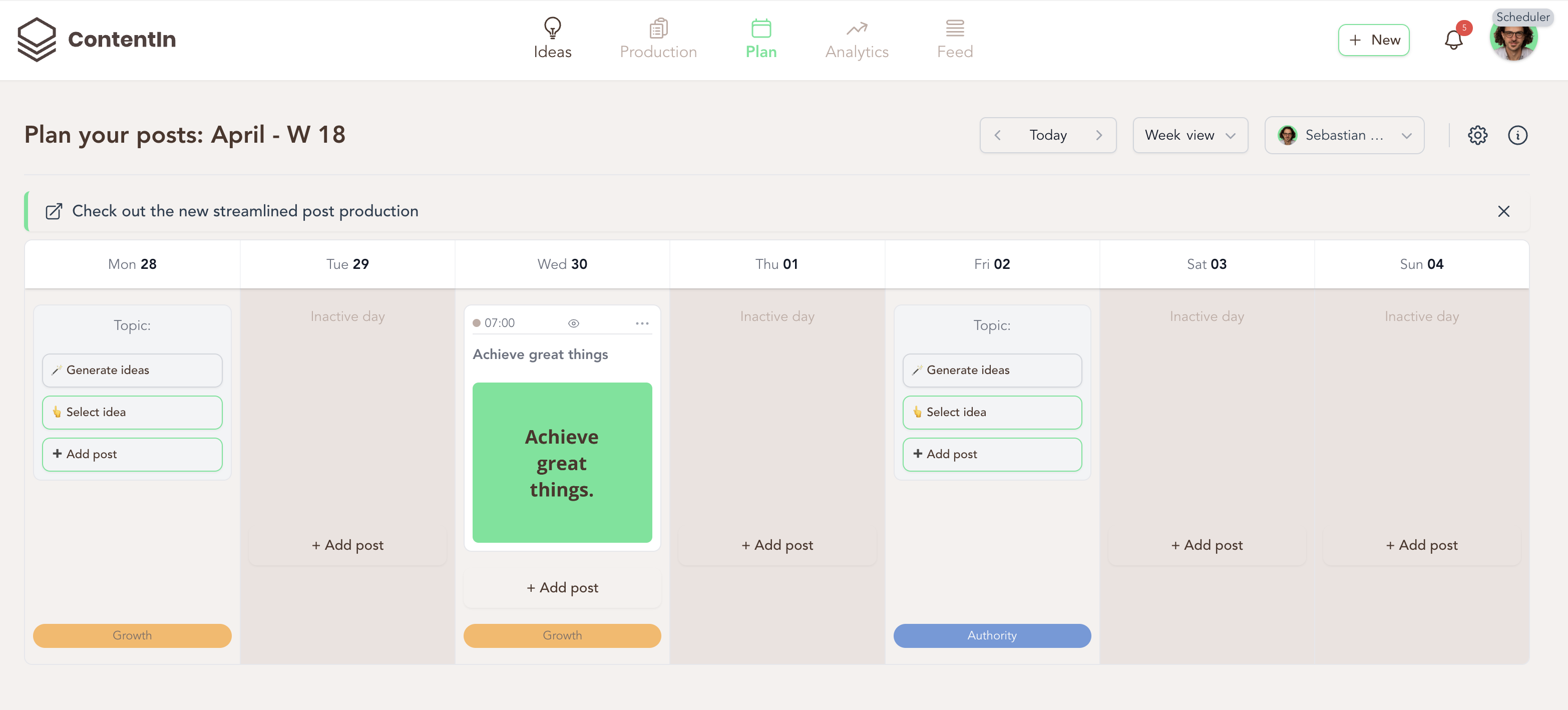
No steep learning curves. No unnecessary features. Just one simple calendar where you:
- Write your posts
- Add images, select GIFs and upload files
- Choose your date and time
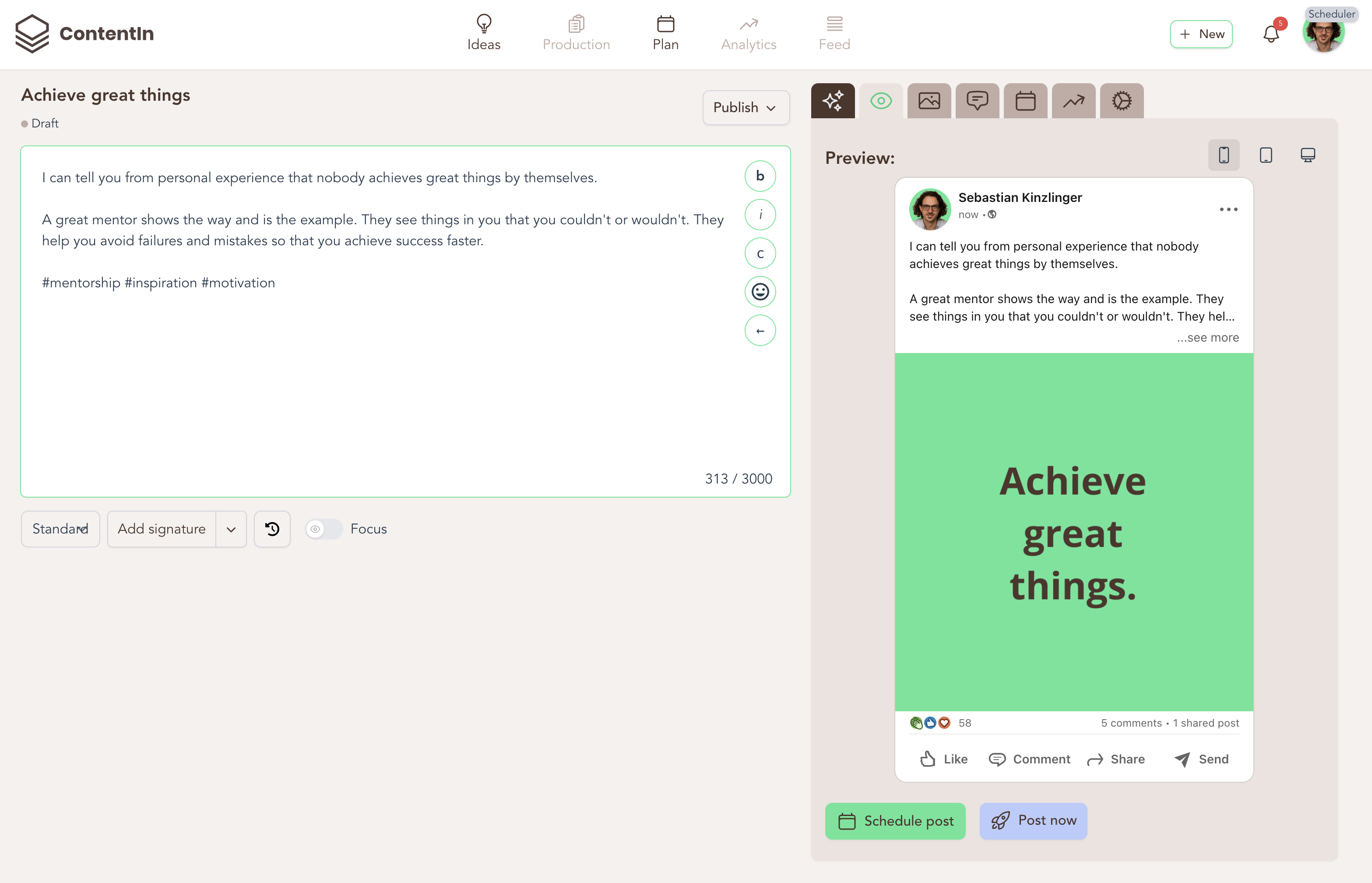
- Preview it before it goes live
- Queue a first comment to post itself right after
That’s it. Zero fluff. 100% momentum.
"This used to take me hours. Now I schedule a week of posts in 30 minutes."
– Ralf Gabler, Coach Elite Health365
Join 1,000+ coaches, creators, and founders who've simplified their LinkedIn presence with the scheduler built for real people, not marketers.
This scheduler was built for:
- Coaches tired of procrastinating content
- Creators who hate clunky scheduling tools
- Founders who want to schedule in advance
- Solopreneurs who just want to stay consistent without stress
"This used to take me hours. Now I schedule a week of posts in 30 minutes." — A user who found their groove
Here is how it works
(Create a week's worth of content easily)
No need to dig through menus or tabs.
No need to dig through menus or tabs.
Made for real people who want to post without the hassle
This isn’t just about posting.
It’s about showing up for your audience, building trust, and growing your brand.
What makes this tool different:
Posts Scheduler
Plan your content ahead of time. No more stress, just memorable content in the right time.
Previews before posting
Always know what’s going live. Preview how they will show up for your feed.
Add images, GIFs, videos and carousels
Because visuals matter, you get to add your own images and files.
Simple scheduling
A simple box, and a calendar to help you. Add images, GIFs, videos and carousels.
Idea manager
Got an idea? Save it in the idea manager for the next time you need it.
(Coming soon!) 60+ Proven LinkedIn Content Templates
Use the templates from the top 1% creators
Scheduled first comments
Queue the first comment with your link or lead magnet — it posts itself right after the post goes live.
Add it to your toolkit.
Fall in love with your content process again.
Founders, coaches and consultants who now post every week
“ContentIn is awesome. Since I started using it I'm effortlessly posting every day. Something I never managed before.”
“I have already scheduled 14 posts yesterday. Big thumbs-up! The app really makes writing posts a lot easier for me.”
“I tested 3 tools to up my LI game: Taplio, AuthoredUp and ContentIn — yours is by far my favourite. The best AI I've seen for LinkedIn content.”
“I really dig the choice of words and the overall format. It has a human feel to it rather than AI generated.”
“I love how the Ghostwriter helps me think. It makes me write better posts than I ever could on my own.”

“Every client we have shown your product to loves it. So much so that they're asking us to make it a core part of our programs.”

“Super intuitive and fantastic for idea generation. I rarely pay for apps — I signed up annually to make sure I keep using it.”
“I was really eager to start writing, since the structure was already prepared for me.”
Ready to stay consistent on LinkedIn?
Plan a full week of posts in one go.
Frequently asked questions
Do you have other questions? Please reach out to us on the chat.
Plan a full week of posts in one go. It’s fast. It’s free to try. It actually works.